> ## Documentation Index
> Fetch the complete documentation index at: https://docs.riqra.com/llms.txt
> Use this file to discover all available pages before exploring further.

# Cambiar la moneda para informes de Google Analytics

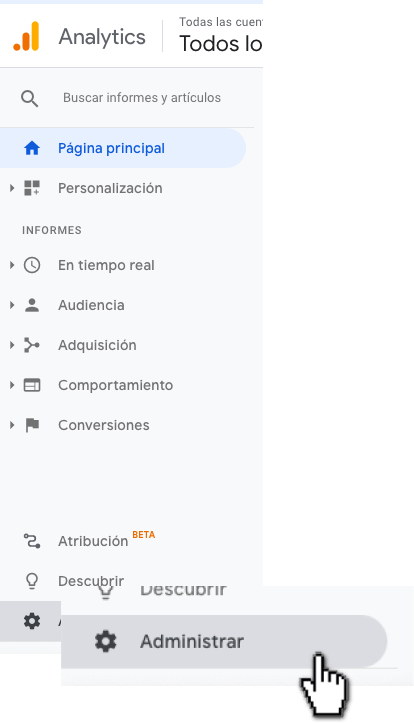
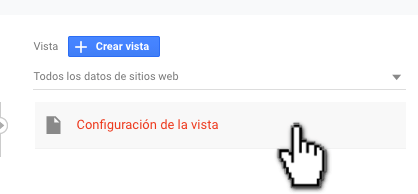
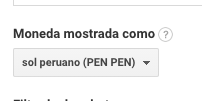
> 1\. Clic en administrar 2\. En la tercera columna, Vista, hacer clic a "Configuración de la vista" 3\. En la sección "Moneda mostrada como"…

1\. Clic en administrar
<img src="https://mintcdn.com/riqra-6746389f/8gWEo4JO8KcsZwjO/ecommerce/images/Group-860.png?fit=max&auto=format&n=8gWEo4JO8KcsZwjO&q=85&s=d4b2a62b89e05558370310ec4f860d5a" alt="Group_860.png" width="414" height="723" data-path="ecommerce/images/Group-860.png" />

2\. En la tercera columna, Vista, hacer clic a "Configuración de la vista"
<img src="https://mintcdn.com/riqra-6746389f/8gWEo4JO8KcsZwjO/ecommerce/images/Group-861.png?fit=max&auto=format&n=8gWEo4JO8KcsZwjO&q=85&s=a57f68e6a059cfdd211d5adf80fcceef" alt="Group_861.png" width="418" height="194" data-path="ecommerce/images/Group-861.png" />

3\. En la sección "Moneda mostrada como" seleccionar la moneda deseada para la vista:
<img src="https://mintcdn.com/riqra-6746389f/3kGi7UwY_fmYGp8k/ecommerce/images/mceclip1-1.png?fit=max&auto=format&n=3kGi7UwY_fmYGp8k&q=85&s=6218951800449b9c10be646d9d49451b" alt="mceclip1.png" width="202" height="101" data-path="ecommerce/images/mceclip1-1.png" />

4\. Para guardar el cambio, hacer clic en guardar

<img src="https://mintcdn.com/riqra-6746389f/3txsikB51GC36jys/ecommerce/images/mceclip2-2.png?fit=max&auto=format&n=3txsikB51GC36jys&q=85&s=3d685cc58377caae09b8c9ea25df2a1b" alt="mceclip2.png" width="92" height="48" data-path="ecommerce/images/mceclip2-2.png" />
